GDAL 3.13.3, PROJ 9.9, rasterio 1.5.2 (libgdal 3.13.3), xarray 2026.9.0Who this is for
rasterio is a well-made window onto one part of GDAL: classic two-dimensional band rasters, read and written through a Pythonic API. Much of what matters for array planning sits outside that window. GDAL has a second, multidimensional data model, dataset names that form a small language, VRT as a lazy recipe format, and a warper with defaults that decide results.
This guide is for people who know xarray, numerical models and rasterio, and want to review the GIS side of a design with confidence. It is not a tutorial. It names what the rasterio view hides, shows it, and says what to look for.
Each section has four parts: The Familiar, what GDAL actually has, an example, and what to look for. Every example runs when this post is rendered, on small synthetic files with no network. This rendering used:
| You know (rasterio) | GDAL underneath | What the window hides |
|---|---|---|
rasterio.open(path) |
gdal.OpenEx(name, flags, open_options) |
the multidimensional model; dataset names beyond paths; per-driver open options |
ds.transform, an Affine |
the geotransform, six numbers | a different order of the same numbers; corner anchoring |
ds.read(out_shape=...) |
RasterIO with a buffer size and resampling |
overview selection on a decimated read |
reproject, WarpedVRT |
GDALWarp, the warped VRT |
the transformer chain, error threshold, chunking, kernel scaling |
ds.crs |
OGRSpatialReference |
axis order and the data-axis mapping |
ds.nodata, masked=True |
nodata, mask bands and flags | scale and offset are never applied for you |
rasterio.Env(...) |
config options | four other kinds of options |
| nothing | multidimensional arrays, VRT kinds, geolocation arrays, the gdal CLI and its pipelines |
most of what an array planner needs |
Two raster data models
GDAL has two raster models, and rasterio exposes only one. The classic model is a stack of 2-D bands sharing one grid. The multidimensional model has groups, named dimensions, N-D arrays, indexing variables and attributes, much like netCDF, Zarr or an xarray Dataset.
The Familiar. A raster is bands on a grid. A netCDF variable with a time axis is “a raster with many bands”.
What GDAL has. The same file opens either way, and the two views differ in what they keep:
- Classic (
gdal.Open): extra dimensions are flattened into bands. Each band records its position in metadata (NETCDF_DIM_time), as a value in the file’s own units, not as a date. The driver may also flip the grid to north-up (see the netCDF section). - Multidimensional (
gdal.OpenEx(name, gdal.OF_MULTIDIM_RASTER)): dimensions keep their names, order and indexing variables. Arrays offer lazy views:GetView(numpy-style slicing),Transpose,GetUnscaled,GetMask,GetResampled(warp an array), andAsClassicDatasetto go back to bands.
demo.nc is a (time, lat, lon) file written by xarray, latitude ascending:
ds = gdal.Open('NETCDF:"demo.nc":temp')
print("classic: bands", ds.RasterCount, " gt", ds.GetGeoTransform())
print("band 2 metadata:", {k: v for k, v in ds.GetRasterBand(2).GetMetadata().items() if "time" in k})
print("band 1, row 0:", ds.GetRasterBand(1).ReadAsArray()[0], " (the last latitude row of the file)")

md = gdal.OpenEx("demo.nc", gdal.OF_MULTIDIM_RASTER)
arr = md.GetRootGroup().OpenMDArray("temp")
print("multidim dims:", [(d.GetName(), d.GetSize()) for d in arr.GetDimensions()])
print('GetView("[1,::2,:]"):', arr.GetView("[1,::2,:]").ReadAsArray().tolist())
print("AsClassicDataset(2, 1) gt:", arr.AsClassicDataset(2, 1).GetGeoTransform())
classic: bands 3 gt (145.0, 1.0, 0.0, -40.0, 0.0, -1.0)
band 2 metadata: {'NETCDF_DIM_time': '1'}
band 1, row 0: [15. 16. 17. 18. 19.] (the last latitude row of the file)
multidim dims: [('time', 3), ('lat', 4), ('lon', 5)]
GetView("[1,::2,:]"): [[20.0, 21.0, 22.0, 23.0, 24.0], [30.0, 31.0, 32.0, 33.0, 34.0]]
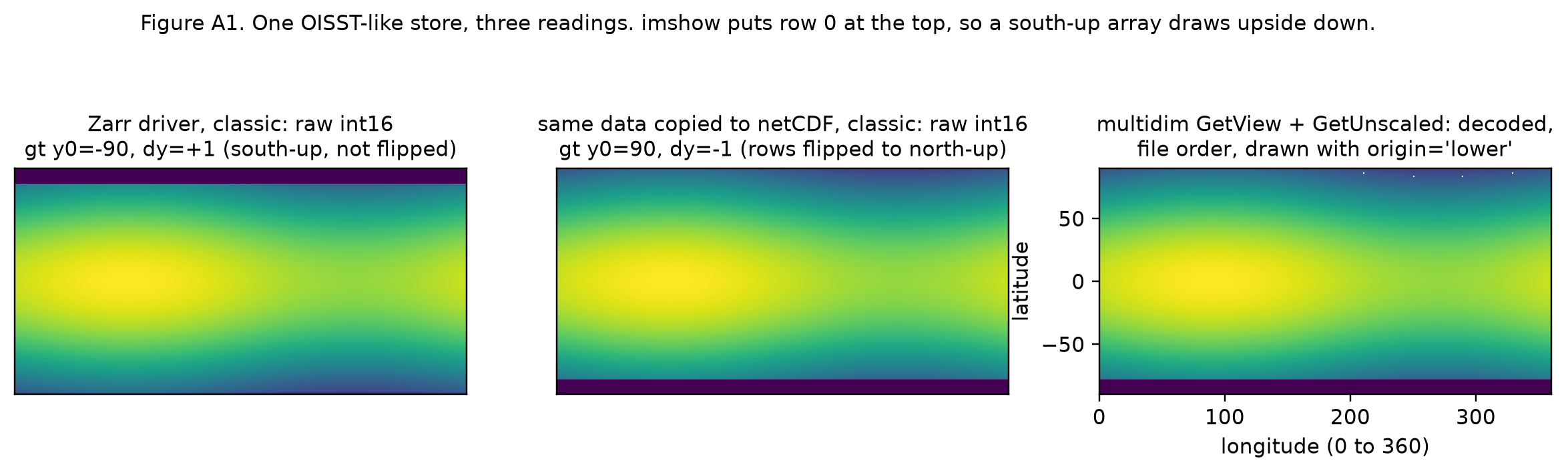
AsClassicDataset(2, 1) gt: (145.0, 1.0, 0.0, -44.0, 0.0, 1.0)The same data has two geotransforms, one north-up and one south-up, depending on the path. Neither is wrong. Each describes its own view.
See Figure A1: one store read three ways.
Look for.
- A plan that says “GDAL” should say which model it uses. Bands-as-slices and arrays-with-dimensions have different metadata, ordering and flips.
- Band order is a flattening of the extra dimensions. Where a plan relies on it, the plan should state the order, not leave it to the driver.
GetView,GetResampledand the multidimensional VRT are lazy, like xarray. Lowering to them is often closer to an array IR than lowering to bands.
Dataset names are a language
A GDAL dataset name is not a path. It is a string that can choose a driver, a variable, a virtual file system, a sub-window, an overview level or a CRS override, all before anything is read.
The Familiar. You pass a path or an S3 URL to open().
What GDAL has. Three layers compose inside one string:
- Virtual file systems, prefixes that nest:
/vsicurl/,/vsis3/,/vsiaz/,/vsigs/,/vsizip/,/vsitar/,/vsimem/(in memory), and/vsikerchunk_json_ref/and/vsikerchunk_parquet_ref/, which read kerchunk byte-reference stores as files./vsizip//vsicurl/https://.../a.zip/inner.tifreads one member of a remote zip with range requests. - Driver prefixes, which choose a driver and a part of the file:
NETCDF:"file.nc":temp,HDF5:"file.h5"://group/var,ZARR:"/vsis3/bucket/store.zarr":/group/var. - The
vrt://connection string, a whole recipe in query parameters:bands,ovr,srcwin,projwin,outsize,tr,r,a_srs,a_ullr,a_nodata,a_scale,otand more. It isgdal_translateas a URL.
print([p for p in gdal.GetFileSystemsPrefixes() if "kerchunk" in p])
for dsn in ["/vsizip/bundle.zip/inner/src.tif",
            "vrt://src.tif?bands=2&ovr=1",
            "vrt://src.tif?srcwin=10,10,50,20&a_srs=EPSG:4283",
            "vrt://src.tif?outsize=50%,50%&r=average"]:
    d = gdal.Open(dsn)
    gt = d.GetGeoTransform()
    print(f"{dsn:50s} -> {d.RasterXSize}x{d.RasterYSize} bands={d.RasterCount} origin=({gt[0]:g}, {gt[3]:g})")
['/vsikerchunk_json_ref/', '/vsikerchunk_json_ref_cached/', '/vsikerchunk_parquet_ref/']
/vsizip/bundle.zip/inner/src.tif -> 400x200 bands=2 origin=(100, -30)
vrt://src.tif?bands=2&ovr=1 -> 100x50 bands=1 origin=(100, -30)
vrt://src.tif?srcwin=10,10,50,20&a_srs=EPSG:4283 -> 50x20 bands=2 origin=(101, -31)
vrt://src.tif?outsize=50%,50%&r=average -> 200x100 bands=2 origin=(100, -30)ovr is 0-based: level 1 is the 1/4 overview. The text of a VRT is also a valid dataset name: gdal.Open("<VRTDataset ...>...</VRTDataset>") works, with no file written.
Look for.
- Where a plan says “a binding maps to a GDAL dataset”, the binding target is this string. It can carry a selection, a resampling or a CRS override of its own. Check that the string does no work the plan doesn’t know about, such as
a_srs,ovroroutsize. - Open options (
-oo) change what a name means. The Zarr driver, for example, hasMULTIBAND,DIM_XandDIM_Y, which decide how an N-D array becomes bands. - Remote names do I/O when opened, unless configured otherwise. Opening a
/vsicurl/file can list its directory and read headers (see the options section).
VRT is a recipe, not a file
A VRT is XML that describes a dataset in terms of other datasets. Opening one reads no pixels. GDAL reads only the windows a consumer asks for, through the recipe. In array terms it is a serialised lazy graph, and much closer to an IR than to a file format.
The Familiar. WarpedVRT is a rasterio context manager for reprojecting on the fly.
What GDAL has. Three kinds of VRT, each a different recipe:
| Kind | What it describes | Typical use |
|---|---|---|
| Classic VRT | bands built from windows of source bands, with scaling, nodata, LUTs, and derived bands from pixel functions or expressions | mosaics, subsets, band maths |
| Warped VRT | one warp: source, transformer, resampling, warp options | reprojection, regridding, curvilinear to regular |
| Multidimensional VRT | groups, dimensions and arrays built from slabs and views of source arrays | subsetting and assembling netCDF, Zarr, HDF5 |
A warped VRT records every decision GDAL made. Here is a polar stereographic warp of the 0.1 degree lon/lat GeoTIFF, with the lines that matter pulled out of the XML:
w = gdal.Warp("w.vrt", "src.tif", format="VRT", dstSRS="EPSG:3031",
              xRes=10000, yRes=10000, resampleAlg="bilinear", errorThreshold=0)
w = None
txt = open("w.vrt").read()
print(len(txt), "bytes")
keep = ("<VRTDataset", "<GeoTransform>", "<ResampleAlg>", "<WorkingDataType>", "<Option name",
        "<SourceDataset", "<SrcGeoTransform>", "<Option key")
print("\n".join(l for l in txt.splitlines() if l.strip().startswith(keep)))
3549 bytes
<VRTDataset rasterXSize="415" rasterYSize="470" subClass="VRTWarpedDataset">
<GeoTransform> 2.9083167773179100e+06, 1.0000000000000000e+04, 0.0000000000000000e+00, -7.8567772752448299e+05, 0.0000000000000000e+00, -1.0000000000000000e+04</GeoTransform>
<ResampleAlg>Bilinear</ResampleAlg>
<WorkingDataType>Float32</WorkingDataType>
<Option name="ERROR_THRESHOLD">0</Option>
<Option name="INIT_DEST">0</Option>
<Option name="ERROR_OUT_IF_EMPTY_SOURCE_WINDOW">FALSE</Option>
<SourceDataset relativeToVRT="1">src.tif</SourceDataset>
<SrcGeoTransform>100,0.10000000000000001,0,-30,0,-0.10000000000000001</SrcGeoTransform>
<Option key="CENTER_LONG">120</Option>
<Option key="AREA_OF_INTEREST">100,-50,140,-30</Option>Three things in it were never asked for. The output size and origin were computed from the source footprint. CENTER_LONG and AREA_OF_INTEREST were added so PROJ picks a transformation suited to that region. And INIT_DEST=0 fills cells with no source as 0, a valid data value in this source (see the nodata section).
A derived band computes from sources, and a multidimensional VRT records a view as text:
xml = '''<VRTDataset rasterXSize="400" rasterYSize="200">
  <SRS>EPSG:4326</SRS><GeoTransform>100,0.1,0,-30,0,-0.1</GeoTransform>
  <VRTRasterBand dataType="Float32" band="1" subClass="VRTDerivedRasterBand">
    <PixelFunctionType>expression</PixelFunctionType>
    <PixelFunctionArguments expression="(a - b) * 0.5" />
    <SimpleSource name="a"><SourceFilename>src.tif</SourceFilename><SourceBand>1</SourceBand></SimpleSource>
    <SimpleSource name="b"><SourceFilename>src.tif</SourceFilename><SourceBand>2</SourceBand></SimpleSource>
  </VRTRasterBand>
</VRTDataset>'''
print("expression band, opened from text:", gdal.Open(xml).ReadAsArray(5, 5, 3, 1).tolist())

gdal.MultiDimTranslate("md.vrt", "demo.nc", format="VRT", arraySpecs=["name=temp,view=[0:2,:,1:4]"])
print([l.strip() for l in open("md.vrt") if "SourceView" in l])
expression band, opened from text: [[10.0, 11.0, 12.0]]
['<SourceView>[0:2:1]</SourceView>', '<SourceView>[1:4:1]</SourceView>', '<SourceView>[0:2,:,1:4]</SourceView>']The bands hold x and -x, so (a - b) * 0.5 gives back x. The multidimensional VRT slices the coordinate arrays to match the view.
A VRT can also inline another VRT. Because VRT text is a dataset name, a source’s SourceFilename can hold a whole VRT, XML-escaped. Here one classic VRT holds two warped VRTs with different resampling methods, as two bands:
from xml.sax.saxutils import escape
kw = dict(format="VRT", dstSRS="EPSG:3031", xRes=10000, yRes=10000, errorThreshold=0,
          outputBounds=(3.0e6, -5.5e6, 4.0e6, -4.0e6))
w_near = gdal.Warp("", "src.tif", resampleAlg="near", srcBands=[1], dstBands=[1], **kw)
w_bil = gdal.Warp("", "src.tif", resampleAlg="bilinear", srcBands=[2], dstBands=[1], **kw)

def inline(w):
    return (f'<SimpleSource><SourceFilename>{escape(w.GetMetadata("xml:VRT")[0])}</SourceFilename>'
            f'<SourceBand>1</SourceBand></SimpleSource>')

main = f'''<VRTDataset rasterXSize="{w_near.RasterXSize}" rasterYSize="{w_near.RasterYSize}">
<SRS>EPSG:3031</SRS><GeoTransform>{",".join(map(str, w_near.GetGeoTransform()))}</GeoTransform>
<VRTRasterBand dataType="Float32" band="1">{inline(w_near)}</VRTRasterBand>
<VRTRasterBand dataType="Float32" band="2">{inline(w_bil)}</VRTRasterBand>
</VRTDataset>'''
a = gdal.Open(main).ReadAsArray()
print(f"one string of {len(main)} characters, no files")
print("band 1 matches the near warp:", (a[0] == w_near.ReadAsArray()).all())
print("band 2 matches the bilinear warp:", (a[1] == w_bil.ReadAsArray()).all())
one string of 7730 characters, no files
band 1 matches the near warp: True
band 2 matches the bilinear warp: TrueLook for.
- A plan with several warps can render as one text, not a bundle of files.
- Read the VRT GDAL wrote, not the call that wrote it. Defaults the caller never set (size, origin,
INIT_DEST, the transformation’s area of interest) are in the text, and they decide results. - Classic VRT bands share one grid. Variables on different grids need separate datasets, or the multidimensional VRT.
The geotransform: order, corners, centres
GDAL describes a regular grid with six numbers: (x0, dx, rx, y0, ry, dy). Column i and row j map to x = x0 + i*dx + j*rx and y = y0 + i*ry + j*dy. (x0, y0) is the outer corner of the first cell, never its centre.
The Familiar. An Affine from rasterio, or a pair of 1-D coordinate arrays from xarray, which hold cell centres.
What GDAL has. The same numbers in three spellings:
print("GDAL geotransform:  ", gdal.Open("src.tif").GetGeoTransform(), "  x0, dx, rx, y0, ry, dy")
with rasterio.open("src.tif") as r:
    print("rasterio Affine:    ", tuple(r.transform)[:6], "  a, b, c, d, e, f")
    print("rasterio .to_gdal():", r.transform.to_gdal())
    print("r.xy(0, 0):         ", tuple(map(float, r.xy(0, 0))), "  centre, rasterio's default")
    print('r.xy(0, 0, "ul"):   ', tuple(map(float, r.xy(0, 0, offset="ul"))), "  corner")
print("xarray lon:", xr.open_dataset("demo.nc").lon.values, " GDAL x0:",
      gdal.Open('NETCDF:"demo.nc":temp').GetGeoTransform()[0])
GDAL geotransform: (100.0, 0.1, 0.0, -30.0, 0.0, -0.1) x0, dx, rx, y0, ry, dy
rasterio Affine: (0.1, 0.0, 100.0, 0.0, -0.1, -30.0) a, b, c, d, e, f
rasterio .to_gdal(): (100.0, 0.1, 0.0, -30.0, 0.0, -0.1)
r.xy(0, 0): (100.05, -30.05) centre, rasterio's default
r.xy(0, 0, "ul"): (100.0, -30.0) corner
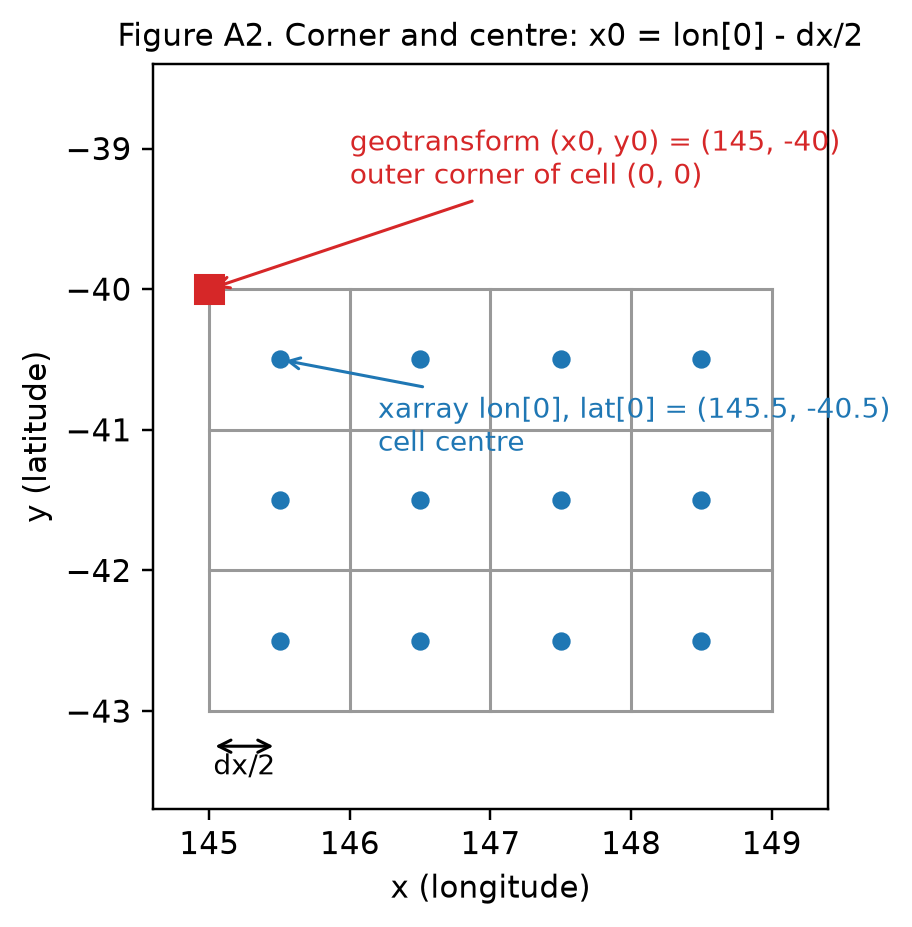
xarray lon: [145.5 146.5 147.5 148.5 149.5] GDAL x0: 145.0The conversion between centres and the corner is exact: x0 = lon[0] - dx/2. The mistakes come from not knowing which one a number is.
See Figure A2: corner and centre on one grid.
PixelIsPoint. GeoTIFF records whether a value covers its cell (AREA_OR_POINT=Area, the default) or is a sample at a point (Point). For Point, the file stores the tie point at the first pixel’s centre, and GDAL shifts it on read so the geotransform is still corner-based. Written with the same geotransform, both files read back identically, and only the metadata differs. Turning the shift off shows what the file actually holds:
gt = (100.0, 0.1, 0.0, -30.0, 0.0, -0.1)
for name, aop in [("area.tif", "Area"), ("point.tif", "Point")]:
    d = gdal.GetDriverByName("GTiff").Create(name, 4, 3, 1, gdal.GDT_Byte)
    d.SetMetadataItem("AREA_OR_POINT", aop)
    d.SetGeoTransform(gt)
    d.SetProjection("EPSG:4326")
    d = None
    d = gdal.Open(name)
    print(f"{name:10s} gt {d.GetGeoTransform()}  AREA_OR_POINT={d.GetMetadataItem('AREA_OR_POINT')}")
with gdal.config_options({"GTIFF_POINT_GEO_IGNORE": "YES"}):
    print("point.tif with GTIFF_POINT_GEO_IGNORE=YES:", gdal.Open("point.tif").GetGeoTransform())
area.tif gt (100.0, 0.1, 0.0, -30.0, 0.0, -0.1) AREA_OR_POINT=Area
point.tif gt (100.0, 0.1, 0.0, -30.0, 0.0, -0.1) AREA_OR_POINT=Point
point.tif with GTIFF_POINT_GEO_IGNORE=YES: (100.05, 0.1, 0.0, -30.05, 0.0, -0.1)So in GDAL the transform is always corner-anchored, and Area or Point is a separate fact about what a value means. Resampling an area and resampling a point sample are different operations, so the fact matters to a warp.
Look for.
- Any six numbers in a plan should say which order they’re in. GDAL’s and
Affine’s orders putx0in different slots, and a swapped tuple is silent. - Any origin should say corner or centre. xarray coordinates, CF coordinates and most model output are centres. A geotransform is a corner.
rxandry(rotation and shear) are legal. Code that assumesrx = ry = 0should say so and reject the rest.dyis usually negative (north-up), but positivedy(south-up) is legal and common in model output read through the multidimensional path.
Axis order and the CRS
Since GDAL 3, a spatial reference built from an EPSG code follows the authority’s axis order, and EPSG:4326 is latitude first. A raster’s spatial reference is the exception: GDAL returns it already set to longitude first, because a geotransform’s x is always the column direction.
The Familiar. x is longitude, y is latitude. rasterio and pyproj.Transformer(..., always_xy=True) keep that true, so the question never comes up.
What GDAL has. Each spatial reference carries a data-axis-to-CRS-axis mapping and a strategy that sets it:
src = osr.SpatialReference(); src.ImportFromEPSG(4326)
dst = osr.SpatialReference(); dst.ImportFromEPSG(3031)
print("EPSG:4326 default mapping", src.GetDataAxisToSRSAxisMapping(),
      " authority compliant:", src.GetAxisMappingStrategy() == osr.OAMS_AUTHORITY_COMPLIANT)
ct = osr.CoordinateTransformation(src, dst)
try:
    print("  (lon, lat):", ct.TransformPoint(147.3, -42.9))
except RuntimeError as e:
    print("  (lon, lat): RuntimeError:", e)
print("  (lat, lon):", ct.TransformPoint(-42.9, 147.3))
src.SetAxisMappingStrategy(osr.OAMS_TRADITIONAL_GIS_ORDER)
print("traditional mapping", src.GetDataAxisToSRSAxisMapping(), " (lon, lat):",
      osr.CoordinateTransformation(src, dst).TransformPoint(147.3, -42.9))
print("pyproj always_xy:", pyproj.Transformer.from_crs(4326, 3031, always_xy=True).transform(147.3, -42.9))
print("a raster's SRS:", gdal.Open("src.tif").GetSpatialRef().GetDataAxisToSRSAxisMapping())
EPSG:4326 default mapping [1, 2] authority compliant: True
(lon, lat): RuntimeError: PROJ: stere: Invalid latitude
(lat, lon): (2925390.66403937, -4556764.261902385, 0.0)
traditional mapping [2, 1] (lon, lat): (2925390.66403937, -4556764.261902385, 0.0)
pyproj always_xy: (2925390.66403937, -4556764.261902385)
a raster's SRS: [2, 1]The error was luck: 147.3 is not a valid latitude. Swapped coordinates whose values are valid both ways transform without complaint, to the wrong place.
The CRS definition also has a form. WKT1, WKT2 and PROJJSON are not interchangeable: WKT1 can’t express some CRSs (datum ensembles, some dynamic and vertical CRSs), and +proj strings lose the datum and axis information. Two texts can define the same CRS, so equality by string comparison is conservative: it can miss a match, but never claims a false one.
Look for.
- Any coordinate pair that crosses a library boundary should say which axis comes first, or say which strategy is in force.
- Geolocation arrays, GCPs and bounding boxes are coordinates, not geotransforms. They follow whatever mapping the code that reads them uses.
- A stored CRS should be WKT2 or PROJJSON, kept as given. A
+projstring or an EPSG code alone loses information that can change results by metres. - Where an engine picks a transformation pipeline, the choice depends on PROJ’s version, its grids, and the area of interest it was given (the warped VRT above has one). Datum shifts between versions are a real source of disagreement at the metre level.
What the netCDF driver does to model output
Through the classic API, the netCDF driver reshapes model output to fit bands on a north-up grid. Through the multidimensional API, it leaves the file as it is. xarray decodes values that GDAL’s classic read doesn’t. Four behaviours matter most.
The Familiar. xr.open_dataset gives you the file, decoded. GDAL gives you the same thing as bands.
What GDAL has.
- Flipping. A file with latitude ascending is presented north-up, rows reversed, with
dy < 0(shown in the two-models section). The config optionGDAL_NETCDF_BOTTOMUP=NOstops the row flip but, on this file, keeps the north-up geotransform, so the data is mislocated by the full height. It is not a safe switch. The multidimensional API never flips. - Bands from dimensions. Every dimension other than the two grid dimensions is flattened into bands, recorded as
NETCDF_DIM_<name>metadata in the file’s raw units. - Packing is not undone. A packed variable (
int16withscale_factor,add_offset,_FillValue) reads as its stored integers. The scale and offset are reported, not applied. The open optionHONOUR_VALID_RANGE(defaultYES) also turns values outsidevalid_minandvalid_maxinto nodata. The multidimensionalGetUnscaled()applies scale and offset, and maps the fill value to NaN. - 2-D coordinates become geolocation arrays. For a variable whose
coordinatesattribute names 2-Dlonandlat, the driver can’t make a geotransform. It reports the default identity(0, 1, 0, 0, 0, 1)and attaches aGEOLOCATIONmetadata domain instead.
with gdal.config_options({"GDAL_NETCDF_BOTTOMUP": "NO"}):
    d = gdal.Open('NETCDF:"demo.nc":temp')
    print("BOTTOMUP=NO: gt", d.GetGeoTransform(), " row 0:", d.GetRasterBand(1).ReadAsArray()[0])

sst = np.array([[10.0, 10.5, np.nan], [11.0, 11.25, 12.0]])
xr.Dataset({"sst": (("lat", "lon"), sst)},
           coords={"lat": [-43.0, -42.0], "lon": [145.0, 146.0, 147.0]}).to_netcdf(
    "packed.nc", encoding={"sst": {"dtype": "int16", "scale_factor": 0.01, "add_offset": 0.0,
                                   "_FillValue": -32768}})
pds = gdal.Open('NETCDF:"packed.nc":sst')
b = pds.GetRasterBand(1)
print("classic ReadAsArray:", b.ReadAsArray().tolist(), gdal.GetDataTypeName(b.DataType))
print("  GetScale", b.GetScale(), " GetOffset", b.GetOffset(), " GetNoDataValue", b.GetNoDataValue())
a = gdal.OpenEx("packed.nc", gdal.OF_MULTIDIM_RASTER).GetRootGroup().OpenMDArray("sst")
print("mdim GetUnscaled:   ", a.GetUnscaled().ReadAsArray().tolist())
print("xarray:             ", xr.open_dataset("packed.nc").sst.values.tolist())

j, i = np.mgrid[0:6, 0:8].astype(float)
lon2, lat2 = 140 + i + j * 0.3, -50 + j + i * 0.2
xr.Dataset({"temp": (("y", "x"), (i + 10 * j).astype("float32"), {"coordinates": "lat lon"})},
           coords={"lon": (("y", "x"), lon2, {"units": "degrees_east", "standard_name": "longitude"}),
                   "lat": (("y", "x"), lat2, {"units": "degrees_north", "standard_name": "latitude"})}
           ).to_netcdf("curvi.nc")
cds = gdal.Open('NETCDF:"curvi.nc":temp')
print("curvilinear gt:", cds.GetGeoTransform())
print({k: v for k, v in cds.GetMetadata("GEOLOCATION").items() if k != "SRS"})
BOTTOMUP=NO: gt (145.0, 1.0, 0.0, -40.0, 0.0, -1.0) row 0: [0. 1. 2. 3. 4.]
classic ReadAsArray: [[1100, 1125, 1200], [1000, 1050, -32768]] Int16
GetScale 0.01 GetOffset 0.0 GetNoDataValue -32768.0
mdim GetUnscaled: [[10.0, 10.5, nan], [11.0, 11.25, 12.0]]
xarray: [[10.0, 10.5, nan], [11.0, 11.25, 12.0]]
curvilinear gt: (0.0, 1.0, 0.0, 0.0, 0.0, 1.0)
{'X_DATASET': 'NETCDF:"curvi.nc":lon', 'X_BAND': '1', 'Y_DATASET': 'NETCDF:"curvi.nc":lat', 'Y_BAND': '1', 'PIXEL_OFFSET': '0', 'PIXEL_STEP': '1', 'LINE_OFFSET': '0', 'LINE_STEP': '1', 'GEOREFERENCING_CONVENTION': 'PIXEL_CENTER'}The netCDF driver says PIXEL_CENTER, because CF coordinates are centres. Geolocation metadata written by hand, in a VRT for example, defaults to TOP_LEFT_CORNER, half a cell away.
Figure A1 shows the flip, against the Zarr driver, which doesn’t flip.
One Python trap is worth knowing: gdal.Open(name).GetRasterBand(1).ReadAsArray() can fail, because the dataset is garbage-collected while its band is still in use. Keep a reference to the dataset, as pds does above.
Look for.
- A geotransform of
(0, 1, 0, 0, 0, 1)means “no georeferencing”, not a grid with unit cells at the origin. - Values read through GDAL’s classic API from a CF file may be packed. Check whether scale and offset were applied, and in which type nodata or
_FillValueis compared. - Band index to time step is a mapping the driver chose. Read
NETCDF_DIM_*metadata rather than assuming bandkis time stepk. - For curvilinear grids, the convention line is part of the coordinates’ meaning. Make sure it is stated wherever geolocation arrays are written.
The warper is an engine, not reproject()
gdalwarp is a chunked resampling engine with defaults that change results. Its output depends on the error threshold, the memory limit, overview selection and a kernel scale it estimates for itself. Each can be pinned, and a reproducible warp pins all of them.
The Familiar. reproject(src, dst, resampling=Resampling.cubic): a function of the source, a target grid and a method.
What GDAL has. A pipeline, each stage with its own options:
- The target grid. If you don’t give one, it is computed from the source footprint.
- The transformer.
GenImgProjTransformerchains source pixel to source CRS (a geotransform, GCPs, RPCs or geolocation arrays), source CRS to target CRS (PROJ), and target CRS to target pixel. By default it is wrapped in an approximate transformer that interpolates linearly along each row and only computes exactly where the error, measured in source pixels, exceeds-et(0.125). - Chunking. The output is processed in chunks sized by
-wm. For each chunk GDAL computes the source window it needs and, for convolution kernels, estimates the kernel scale (XSCALE,YSCALE). - Overviews. When downsampling, gdalwarp reads from a source overview by default (
-ovr AUTO). - The kernel, with one resampling method for all bands, a working data type, and the type conversion at the end.
d = gdal.Warp("", "field.tif", format="VRT", dstSRS="EPSG:3031")
print(f"no target given: chose {d.RasterXSize} x {d.RasterYSize} at {d.GetGeoTransform()[1]:.2f} m")
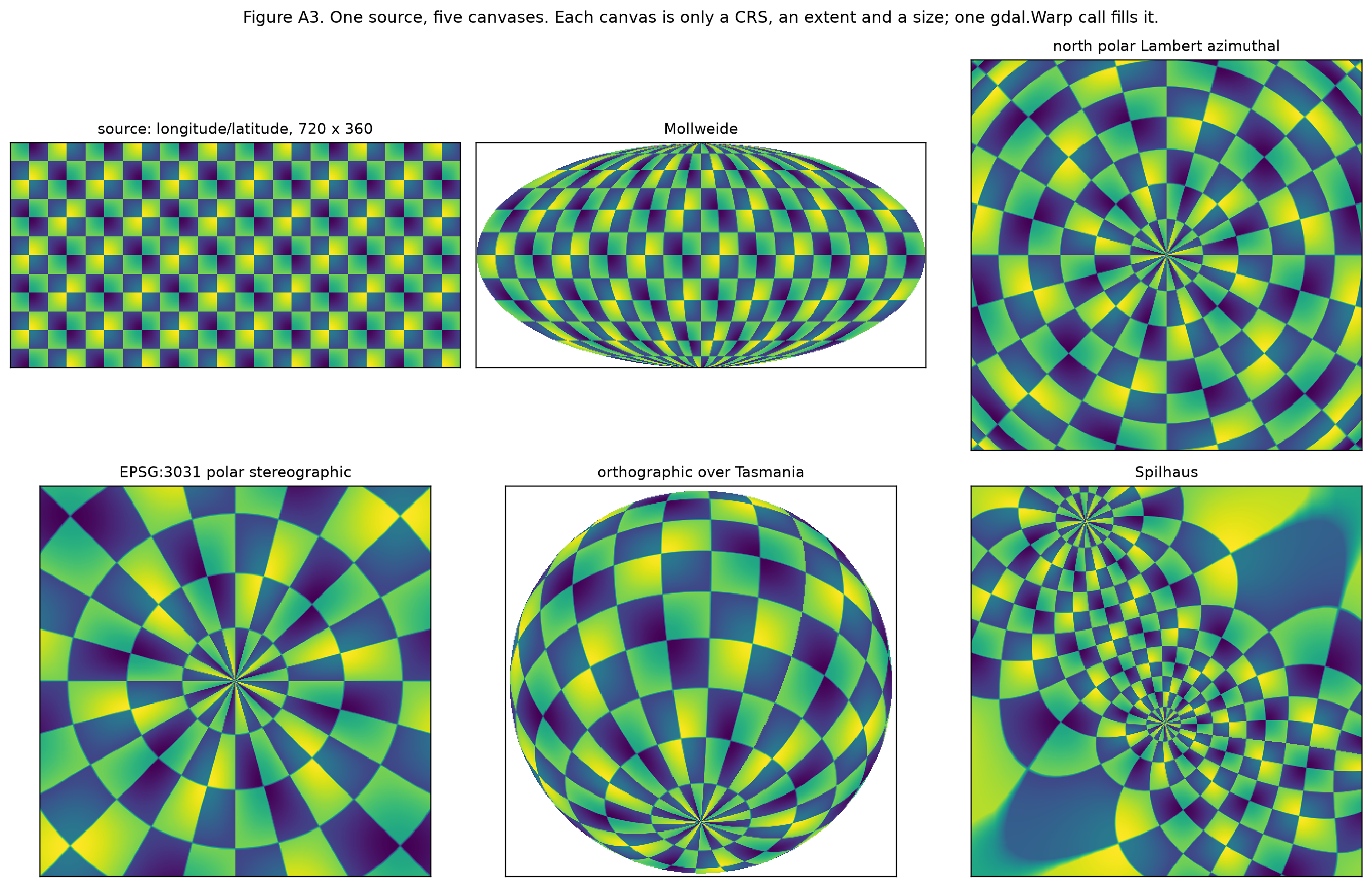
no target given: chose 2333 x 2470 at 1738.44 mA map canvas is a grid spec. A GIS screen is a target grid: a CRS, an extent and a pixel size, which is to say a geotransform and two dimensions. Each pan or zoom is a new target grid. The warper fills it from any source, in any projection PROJ can express, reading only the windows and overview levels that view needs. Wiring the warper to an interactive graphics device is a loop around one call:
def canvas(crs, cx, cy, width_m, nx=800, ny=600):
    h = width_m * ny / nx
    return dict(dstSRS=crs, width=nx, height=ny,
                outputBounds=(cx - width_m / 2, cy - h / 2, cx + width_m / 2, cy + h / 2))

views = {
    "polar stereographic": canvas("EPSG:3031", 2.4e6, -3.3e6, 3.0e6),
    "orthographic over Tasmania": canvas("+proj=ortho +lon_0=147 +lat_0=-43", 0, 0, 3.0e6),
    "Spilhaus (whole world)": canvas("+proj=spilhaus", 0, 0, 4.0e7),
    "zoomed in, orthographic": canvas("+proj=ortho +lon_0=147 +lat_0=-43", -1.0e5, 2.0e5, 3.0e5),
}
for name, spec in views.items():
    t0 = time.time()
    v = gdal.Warp("", "field.tif", format="MEM", resampleAlg="bilinear", errorThreshold=0,
                  dstNodata=-9999, **spec).ReadAsArray()
    print(f"{name:28s} {v.shape[1]}x{v.shape[0]}  filled {(v != -9999).mean():6.1%}  {time.time() - t0:.2f}s")
polar stereographic 800x600 filled 89.2% 0.37s
orthographic over Tasmania 800x600 filled 58.5% 0.31s
Spilhaus (whole world) 800x600 filled 0.2% 0.39s
zoomed in, orthographic 800x600 filled 100.0% 0.22sNo tiles and no fixed web projection are involved: the view itself is the grid. A plan’s Warp target and a screen are the same kind of thing.
See Figure A3: one source on five canvases.
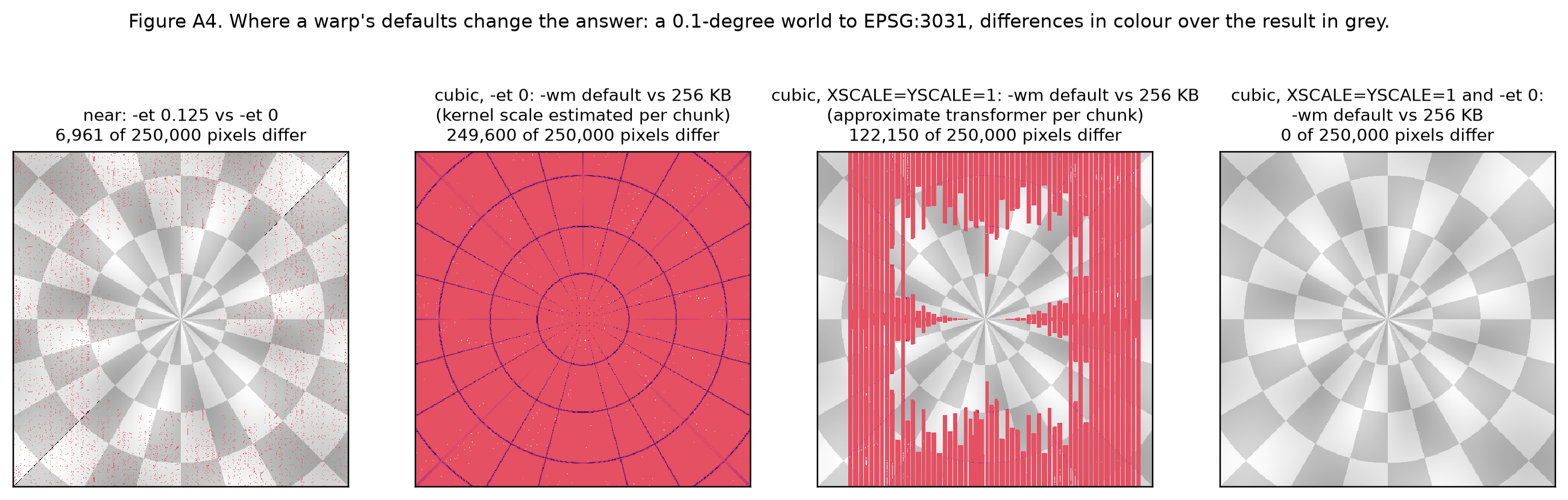
Now the defaults. Each row compares two warps of the same field to polar stereographic that differ in one setting:
def warp(**kw):
    base = dict(format="MEM", dstSRS="EPSG:3031", outputBounds=(1.5e6, -3.9e6, 3.0e6, -2.4e6),
                width=200, height=200, resampleAlg="cubic", overviewLevel="NONE")
    base.update(kw)
    return gdal.Warp("", "field.tif", **base).ReadAsArray()

S, small = ["XSCALE=1", "YSCALE=1"], 256 * 1024
rows = [
    ("`-et 0.125` (default) vs `-et 0`", "near",
     warp(resampleAlg="near", width=600, height=600), warp(resampleAlg="near", width=600, height=600, errorThreshold=0)),
    ("default `-wm` vs 256 KB", "near", warp(resampleAlg="near"), warp(resampleAlg="near", warpMemoryLimit=small)),
    ("default `-wm` vs 256 KB", "bilinear", warp(resampleAlg="bilinear"), warp(resampleAlg="bilinear", warpMemoryLimit=small)),
    ("default `-wm` vs 256 KB", "cubic", warp(), warp(warpMemoryLimit=small)),
    ("same, with `XSCALE=1 YSCALE=1`", "cubic", warp(warpOptions=S), warp(warpOptions=S, warpMemoryLimit=small)),
    ("same, with `XSCALE=1 YSCALE=1` and `-et 0`", "cubic",
     warp(warpOptions=S, errorThreshold=0), warp(warpOptions=S, errorThreshold=0, warpMemoryLimit=small)),
    ("`-ovr AUTO` (default) vs `-ovr NONE`", "average",
     warp(resampleAlg="average", width=150, height=150, overviewLevel="AUTO"),
     warp(resampleAlg="average", width=150, height=150)),
]
print("| Comparison | Method | Pixels that differ | Of | Largest difference |")
print("| --- | --- | --- | --- | --- |")
for label, method, p, q in rows:
    dd = np.abs(p - q)
print(f"| {label} | {method} | {int((dd > 0).sum()):,} | {dd.size:,} | {dd.max():.3g} |")| Comparison | Method | Pixels that differ | Of | Largest difference |
|---|---|---|---|---|
-et 0.125 (default) vs -et 0 |
near | 13,635 | 360,000 | 1.01 |
default -wm vs 256 KB |
near | 318 | 40,000 | 0.986 |
default -wm vs 256 KB |
bilinear | 39,853 | 40,000 | 0.0515 |
default -wm vs 256 KB |
cubic | 39,764 | 40,000 | 0.0548 |
same, with XSCALE=1 YSCALE=1 |
cubic | 19,293 | 40,000 | 0.0704 |
same, with XSCALE=1 YSCALE=1 and -et 0 |
cubic | 0 | 40,000 | 0 |
-ovr AUTO (default) vs -ovr NONE |
average | 22,420 | 22,500 | 0.767 |
The memory limit should not change a result, but here it does, for two separate reasons. The approximate transformer interpolates within each chunk, so chunk boundaries move its errors. The kernel scale is estimated per chunk, so kernels widen differently in different chunks. Pinning both (-et 0 and explicit XSCALE/YSCALE) makes the output independent of chunking.
See Figure A4: maps of where each setting changes the result.
Look for.
- Every warp should state
-et, the kernel scale for convolution methods, and-ovr. Defaults for any of them make the result depend on settings that look like performance tuning. - “Same as gdalwarp” needs the gdalwarp options spelled out, including
-wm, or it isn’t a reproducible claim. - One method for all bands is a limit of one warp call. Variables needing different methods need separate warps (which can still be one VRT text, as the VRT section showed).
- Area methods (
average,mode,min,max,sumand so on) and convolution kernels (bilinear,cubic,lanczos) take their footprints differently, andaverageis not conservative remapping. Name methods by their definitions, not by GDAL’s names.
Geolocation arrays: curvilinear is first class
GDAL warps curvilinear grids (swaths, tripolar and rotated ocean grids) directly, from 2-D longitude and latitude arrays. These are geolocation arrays, and the warper treats them as one more kind of source georeferencing, alongside a geotransform, GCPs and RPCs.
The Familiar. GDAL handles regular grids. Curvilinear model output needs xESMF or a hand-built interpolation.
What GDAL has. A dataset’s GEOLOCATION metadata domain names the arrays (X_DATASET, Y_DATASET), their sampling (PIXEL_OFFSET, PIXEL_STEP, LINE_OFFSET, LINE_STEP), their CRS, and the convention. The transformer interpolates bilinearly between samples, and inverts exactly by default. The arrays can also describe the target: transformer options DST_METHOD=GEOLOC_ARRAY and DST_GEOLOC_ARRAY=<dataset> warp onto a curvilinear grid.
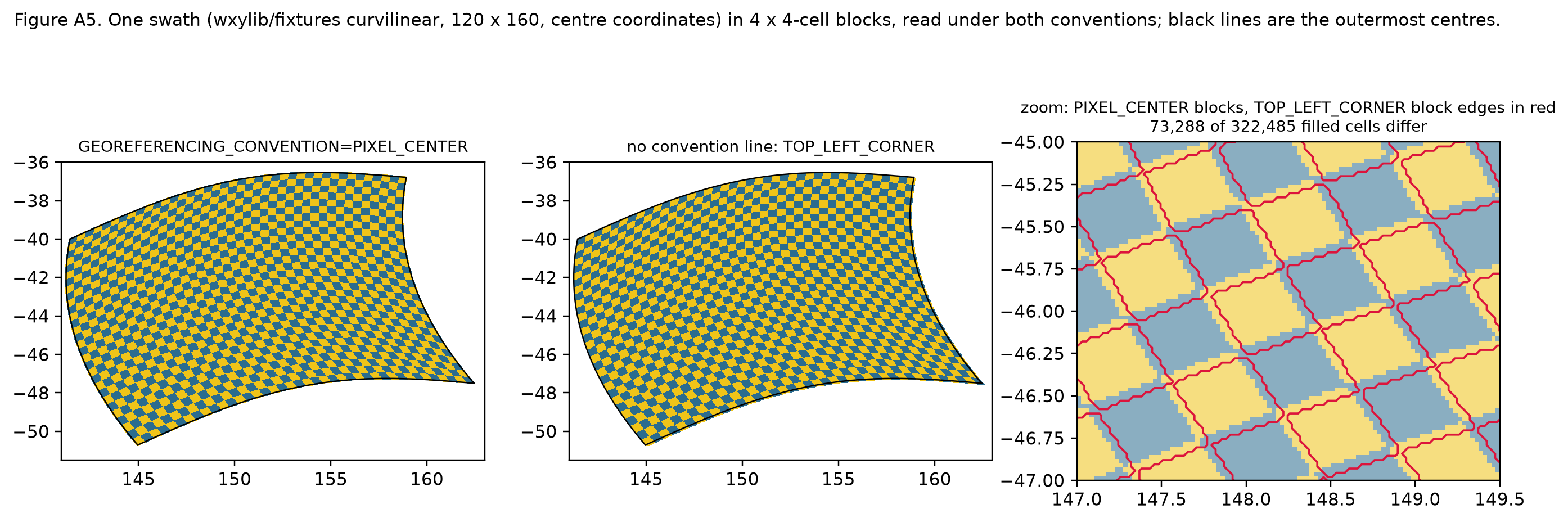
The convention decides where each sample sits. The small curvilinear grid from the netCDF section, warped to 0.25 degrees with near and -et 0, read as centres and then as corners:
opts = dict(format="MEM", dstSRS="EPSG:4326", xRes=0.25, yRes=0.25, outputBounds=(140, -50, 150, -43),
            resampleAlg="near", errorThreshold=0, geoloc=True, dstNodata=-1)
a = gdal.Warp("", cds, **opts).ReadAsArray()
geo = dict(cds.GetMetadata("GEOLOCATION"))
geo.pop("GEOREFERENCING_CONVENTION")
v = gdal.Translate("nocon.vrt", cds, format="VRT")
v.SetMetadata(geo, "GEOLOCATION")
v = None
b = gdal.Warp("", "nocon.vrt", **opts).ReadAsArray()
print("PIXEL_CENTER (from the netCDF driver):  valid cells", int((a >= 0).sum()))
print("no convention line (TOP_LEFT_CORNER):   valid cells", int((b >= 0).sum()))
print("cells that differ:", int((a != b).sum()))
ya, xa = np.argwhere(a == 0).mean(0)
yb, xb = np.argwhere(b == 0).mean(0)
print(f"source cell 0's footprint centre, target pixels: ({xa:.1f}, {ya:.1f}) vs ({xb:.1f}, {yb:.1f})")
PIXEL_CENTER (from the netCDF driver): valid cells 704
no convention line (TOP_LEFT_CORNER): valid cells 684
cells that differ: 601
source cell 0's footprint centre, target pixels: (0.5, 26.5) vs (2.5, 27.0)The whole field moves by about half a source cell. Nothing warns, because both readings are valid.
See Figure A5: a swath under both conventions, with a zoom on the shift.
Look for.
- Any curvilinear source handed to GDAL should carry
GEOREFERENCING_CONVENTIONexplicitly. The netCDF driver setsPIXEL_CENTER; hand-written metadata defaults toTOP_LEFT_CORNER. - Geolocation arrays give centres, not cell bounds. With
PIXEL_CENTER, the implied edges are midpoints between centres in the arrays’ own CRS. That is a definition, and it matters fornear,modeand area methods near strongly curved or folded grids. GDAL_GEOLOC_USE_MAX_ACCURACY=NOswitches the inversion to a faster approximate one. A plan that claims exactness should require the default.- Geolocation arrays can be subsampled (
PIXEL_STEP> 1). The interpolation between samples is then part of the georeferencing, not an error.
Nodata, NaN, masks and types
In GDAL, a value is missing only when something declares it missing: a nodata value, a mask band or an alpha band. NaN is not special by default. Each band reports how its validity is known through mask flags.
The Familiar. NaN means missing, as in xarray and pandas. masked=True in rasterio gives a masked array.
What GDAL has. GetMaskFlags() says where validity comes from: GMF_ALL_VALID (nothing is missing), GMF_NODATA (from the nodata value), GMF_PER_DATASET (one mask shared by all bands, such as a GeoTIFF internal mask), or GMF_ALPHA. A 2 x 2 float band holding [[0, 1], [NaN, 3]], averaged into one cell, with and without NaN declared as nodata; then a warp that leaves cells empty, with and without -dstnodata:
def mem(arr, nodata=None):
    d = gdal.GetDriverByName("MEM").Create("", arr.shape[1], arr.shape[0], 1, gdal.GDT_Float32)
    d.SetGeoTransform((0, 1, 0, 0, 0, -1))
    d.SetProjection("EPSG:3857")
    d.GetRasterBand(1).WriteArray(arr)
    if nodata is not None:
        d.GetRasterBand(1).SetNoDataValue(nodata)
    return d

flagnames = [("ALL_VALID", gdal.GMF_ALL_VALID), ("NODATA", gdal.GMF_NODATA),
             ("PER_DATASET", gdal.GMF_PER_DATASET), ("ALPHA", gdal.GMF_ALPHA)]
xn = np.array([[0.0, 1.0], [np.nan, 3.0]], dtype="float32")
for nd in [None, float("nan")]:
    d = mem(xn, nd)
    bnd = d.GetRasterBand(1)
    flags = [n for n, f in flagnames if bnd.GetMaskFlags() & f]
    avg = gdal.Warp("", d, format="MEM", outputBounds=(0, -2, 2, 0), width=1, height=1,
                    resampleAlg="average").ReadAsArray().ravel()[0]
    print(f"nodata={nd}: flags {flags}, mask {bnd.GetMaskBand().ReadAsArray().tolist()}, average {avg:.4g}")

five = mem(np.full((2, 2), 5, "float32"))
for kw in [{}, {"dstNodata": -9999}]:
    w = gdal.Warp("", five, format="MEM", outputBounds=(-1, -2, 2, 0), width=3, height=2, **kw)
    print(kw or "no dstNodata", "->", w.ReadAsArray().tolist(), " nodata", w.GetRasterBand(1).GetNoDataValue())
nodata=None: flags ['ALL_VALID'], mask [[255, 255], [255, 255]], average nan
nodata=nan: flags ['NODATA'], mask [[255, 255], [0, 255]], average 1.333
no dstNodata -> [[0.0, 5.0, 5.0], [0.0, 5.0, 5.0]] nodata None
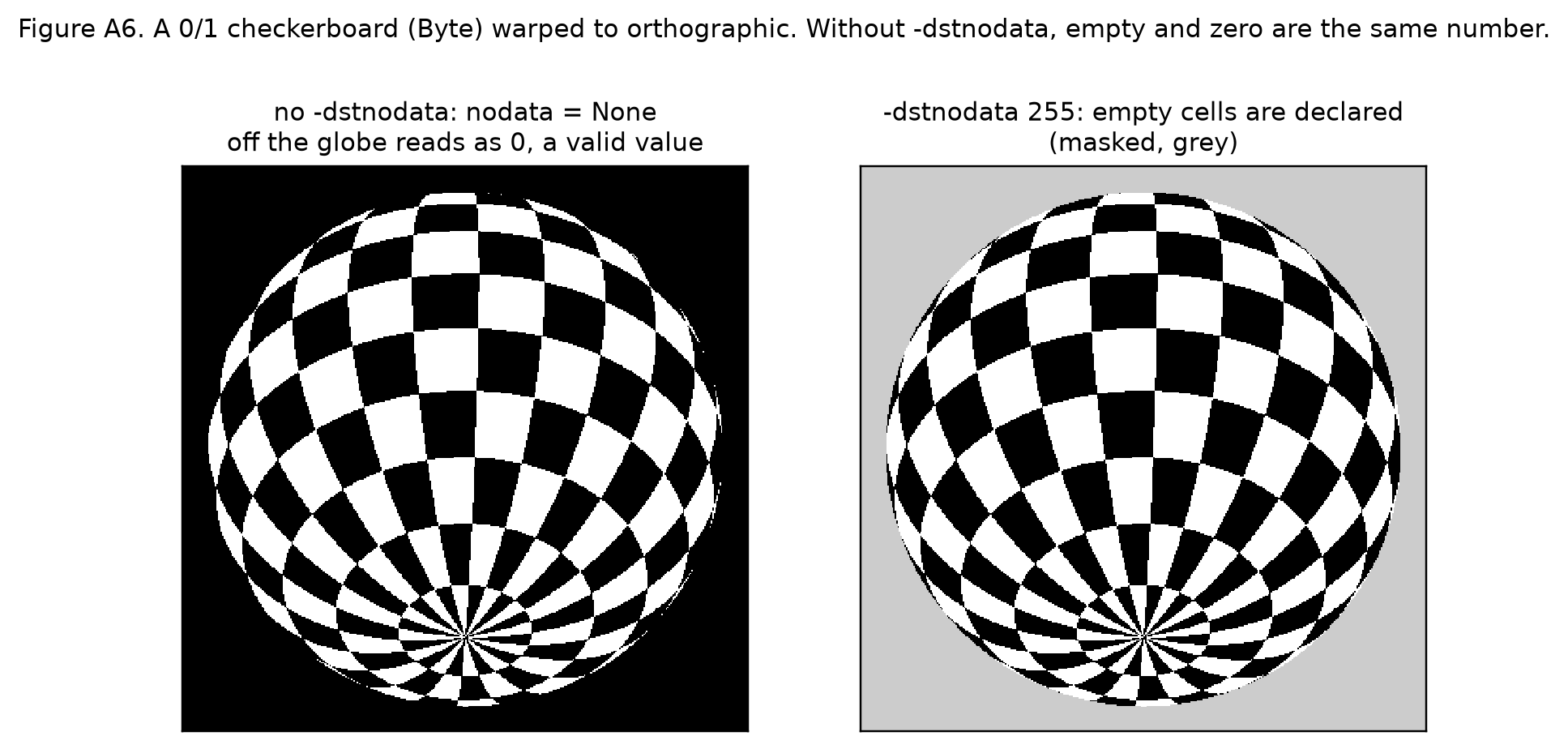
{'dstNodata': -9999} -> [[-9999.0, 5.0, 5.0], [-9999.0, 5.0, 5.0]] nodata -9999.0Without -dstnodata the warper writes 0 (INIT_DEST=0) in cells no source covers, and declares no nodata, so an empty cell reads as a valid zero.
See Figure A6: off the globe reads as a black square.
Types have similar edges. gdalwarp computes in a working type (-wt), the union of the source, target and nodata types. It converts at the end, with clamping and rounding rules that differ between integer and float working types. A computed value equal to the target nodata is nudged off it, but on the float path the final rounding can bring it back. These details are in the source, and they are worth testing before relying on them.
Look for.
- Every warp or reduction should state the missing values of its inputs, including whether NaN counts, and what it writes in empty cells.
- A nodata value is compared in the stored type, before scale and offset are applied.
_FillValuein CF and nodata in GDAL don’t always mean the same thing. A fill value describes unwritten storage, while nodata describes meaning. - A mask band can be shared by all bands (
GMF_PER_DATASET), so per-variable missing values can’t always be expressed in a classic dataset. - Conversion to an integer type has a rounding rule, a clamping rule and a nodata-collision rule. A plan should state all three, or reject the conversion.
Five kinds of options
GDAL has five separate option namespaces, and an option in the wrong one usually draws a warning, not an error, and has no effect. Knowing which kind an option is tells you where it goes and how far its effect reaches.
The Familiar. rasterio.Env(...) for settings, and keyword arguments for everything else.
What GDAL has.
| Kind | Scope | CLI | Python | Example |
|---|---|---|---|---|
| Config | the process or the thread; also environment variables | --config K V |
gdal.config_options({...}), gdal.SetConfigOption |
GDAL_DISABLE_READDIR_ON_OPEN=EMPTY_DIR, GDAL_HTTP_MAX_RETRY, GDAL_CACHEMAX |
| Open | one dataset, one driver | -oo K=V |
gdal.OpenEx(..., open_options=[...]) |
netCDF HONOUR_VALID_RANGE=NO, Zarr MULTIBAND=NO |
| Creation | one output file, one driver | -co K=V |
creationOptions=[...] |
GTiff COMPRESS=ZSTD, TILED=YES |
| Warp | one warp’s kernel and chunking | -wo K=V |
warpOptions=[...] |
XSCALE=1, MODE_TIES=MIN, NUM_THREADS=4, INIT_DEST=NO_DATA |
| Transformer | one warp’s coordinate transform | -to K=V |
transformerOptions=[...] |
SRC_METHOD=GEOLOC_ARRAY, DST_METHOD=GEOLOC_ARRAY, COORDINATE_OPERATION=... |
Each driver lists its valid open and creation options. Config options have two scopes: gdal.config_options is thread-local by default, and it refuses options that only make sense process-wide.
opts = gdal.GetDriverByName("netCDF").GetMetadataItem("DMD_OPENOPTIONLIST")
print("netCDF open options:", [o.split("'")[1] for o in opts.split("<Option name=")[1:]])
try:
    with gdal.config_options({"GDAL_CACHEMAX": "256"}):
        pass
except ValueError as e:
    print("ValueError:", e)
netCDF open options: ['LIST_ALL_ARRAYS', 'HONOUR_VALID_RANGE', 'IGNORE_XY_AXIS_NAME_CHECKS', 'VARIABLES_AS_BANDS', 'ASSUME_LONGLAT', 'PRESERVE_AXIS_UNIT_IN_CRS']
ValueError: Setting GDAL_CACHEMAX has process-wide visibility, and is thus incompatible of the thread_local=True argument of gdal.config_options()Look for.
- An option that changes values belongs in the plan.
XSCALE,MODE_TIES,SRC_METHOD,HONOUR_VALID_RANGEandCOORDINATE_OPERATIONare part of what is computed, not tuning. - An option that changes only speed or I/O (
NUM_THREADS,GDAL_CACHEMAX, HTTP settings) belongs to the host. The warper section showed that-wmlooks like tuning but isn’t, unless-etand the kernel scale are pinned. - Config options set in the environment travel with the process, not the plan. Two runs of one plan can differ because a CI image sets
GDAL_*variables.
The gdal CLI and its pipelines
Since GDAL 3.11 there is a single gdal command with subcommands (gdal raster ..., gdal vector ..., gdal mdim ...), and gdal raster pipeline chains steps with !. A pipeline can be saved unexecuted as a .gdalg.json file, which opens as a dataset and runs on read. It is still marked provisional: its options may change until it is frozen in a future release.
The Familiar. gdal_translate, gdalwarp, gdalinfo, each a separate program with its own flag style.
What GDAL has. Full option names, and the warp settings that decide results are all reachable: --et, --wo, --to, --output-nodata, --target-aligned-pixels.
def run(*args):
    return subprocess.run(["gdal", *args], capture_output=True, text=True).stdout

subs = [l.split(":")[0].strip(" -") for l in run("raster", "--help").splitlines() if l.startswith("  - ")]
print(f"gdal raster: {len(subs)} subcommands, e.g.", ", ".join(s for s in subs if s in
      ("reproject", "resize", "clip", "mosaic", "stack", "calc", "neighbors", "zonal-stats", "unscale", "set-type", "pipeline")))
print("gdal mdim:", [l.split(":")[0].strip(" -") for l in run("mdim", "--help").splitlines() if l.startswith("  - ")])
gdal raster: 44 subcommands, e.g. calc, clip, mosaic, neighbors, pipeline, reproject, resize, set-type, stack, unscale, zonal-stats
gdal mdim: ['convert', 'info', 'mosaic']A pipeline written to GDALG is a small recipe:
subprocess.run(["gdal", "raster", "pipeline", "read", "src.tif", "!", "reproject", "--dst-crs", "EPSG:3031",
                "--resolution", "10000,10000", "--resampling", "bilinear", "!", "write", "out.gdalg.json",
                "--overwrite"], check=True, capture_output=True)
print(open("out.gdalg.json").read())
g = gdal.Open("out.gdalg.json")
print("opens as", g.GetDriver().ShortName, g.RasterXSize, "x", g.RasterYSize)
ref = gdal.Warp("", "src.tif", format="MEM", dstSRS="EPSG:3031", xRes=10000, yRes=10000,
                resampleAlg="bilinear").ReadAsArray()
dd = np.abs(g.ReadAsArray() - ref)
print(f"vs gdal.Warp at the default -et: {int((dd[0] > 0).sum())} of {dd[0].size:,} pixels per band differ, "
      f"by at most {dd.max():.3f}")
alg = gdal.Run("raster", "reproject", input="src.tif", output="", output_format="MEM",
               output_crs="EPSG:3031", resolution=[10000, 10000])
print("gdal.Run(...).Output():", alg.Output().RasterXSize, "x", alg.Output().RasterYSize)
{
"type":"gdal_streamed_alg",
"command_line":"gdal raster pipeline read --input src.tif ! reproject --output-crs EPSG:3031 --resampling bilinear --resolution 10000,10000",
"gdal_version":"3130300"
}
opens as GDALG 415 x 470
vs gdal.Warp at the default -et: 332 of 195,050 pixels per band differ, by at most 0.012
gdal.Run(...).Output(): 415 x 470Look for.
- A pipeline string is another lowering target, alongside VRT. It reads like an operation chain, and its GDALG form records the GDAL version that wrote it.
- The CLI defaults are the library defaults. The pipeline above, given no
--et, differs fromgdal.Warpat the default only where the pipeline streams in different chunks. Shorter commands don’t mean fewer decisions. - The provisional status matters for anything stored. A saved
.gdalg.jsonis a command line, so it depends on option names that may still change.
What to look for when reviewing a plan that lowers to GDAL
A plan that lowers to GDAL is faithful when every value-changing decision is written in the plan, not left to a GDAL default. Each question below catches one way a default slips in. Most take a minute to answer from the plan’s text.
- Which data model? Classic bands or multidimensional arrays. If bands, the flattening order of extra dimensions is stated.
- What does the dataset name do? A binding resolves to a string that can select, resample, override a CRS or carry open options. Nothing the plan doesn’t know about is in it.
- Six numbers in which order? GDAL’s
(x0, dx, rx, y0, ry, dy)orAffine’s(a, b, c, d, e, f). Rotation and shear are handled or rejected. - Corner or centre? Stated for every origin and coordinate array. Area or Point is a separate field.
- Which axis first? Stated at every library boundary. The CRS is stored as WKT2 or PROJJSON, verbatim.
- What did the driver do? Flipped rows, packed integers, valid-range masking, bands from dimensions, an identity geotransform that means “none”.
- Is the warp pinned? Target grid,
-et, kernel scale for convolution methods,-ovr, the method for each variable, working type, and-dstnodata. - For curvilinear sources:
GEOREFERENCING_CONVENTIONis stated, the rule for cell edges is stated, and the exact inversion is required. - Missing values: declared for each input, NaN’s status stated, the empty-cell value given, and the rounding, clamping and collision rules stated for any integer conversion.
- Options sorted: value-changing options are in the plan, and speed and I/O options are left to the host.
Two tests catch most of what reading misses:
- Run it twice with different
-wm. If the outputs differ, something isn’t pinned (the warper section has the numbers). - Check against values worked out by hand, not against GDAL. Comparing GDAL with GDAL shows the plan was rendered faithfully, not that GDAL computes what the plan means. Small fixtures (4 x 4 onto 2 x 2) are enough.
Further reading
- GDAL documentation: multidimensional raster data model, VRT, virtual file systems, gdalwarp, gdal raster pipeline, netCDF driver.
- hypertidy/rwarp: a Rust port of the GDAL warp core that cites the GDAL source it follows, useful for tracing where a result comes from.
- osgeo-upstream notes on gdalwarp kernel findings: chunk-dependent kernel scale,
MODE_TIESon wide types,averageedge weights, with reproductions.
Appendix: figures
Six figures, each made by one function in make_figures.py, which sits beside this post. Two use test data copied from wxylib/fixtures (see fixtures/SOURCE.txt): an OISST-like Zarr store and a curvilinear swath. The rest are made in the script. Run it as python make_figures.py fixtures to write the PNGs.
A1. One store, three readings
The Zarr driver’s classic view keeps this south-up store as written (dy = +1). The netCDF driver flips the same data to north-up. The multidimensional view keeps file order and decodes packing. The fill band near the south pole shows which way up each panel is.
A2. Corner and centre
The geotransform origin is the outer corner. xarray coordinates are centres, half a cell in.
A3. One source, five canvases
A checkerboard world in longitude and latitude, warped to five map canvases. Each canvas is a CRS, an extent and a size, filled by one gdal.Warp call.
A4. Where a warp’s defaults change the answer
Differences between pairs of warps that differ only in one setting. Read left to right: the error threshold alone; the memory limit when the kernel scale is estimated per chunk; the memory limit when the approximate transformer runs per chunk; and both pinned, where the memory limit no longer matters. A widened kernel (XSCALE=0.25) with -et 0 still differs between memory limits, because the source window padding ignores the kernel scale.
A5. A swath under both geolocation conventions
The same centre coordinates read as centres and as corners. The blocks are 4 x 4 source cells. In the zoom, the red block edges (corner reading) sit half a cell from the coloured blocks (centre reading).
A6. The nodata trap
A 0/1 checkerboard warped to an orthographic canvas. Without -dstnodata, the space off the globe is written as 0, the same value as the black squares.